Migrate your ESXI VMs to proxmox ZFS
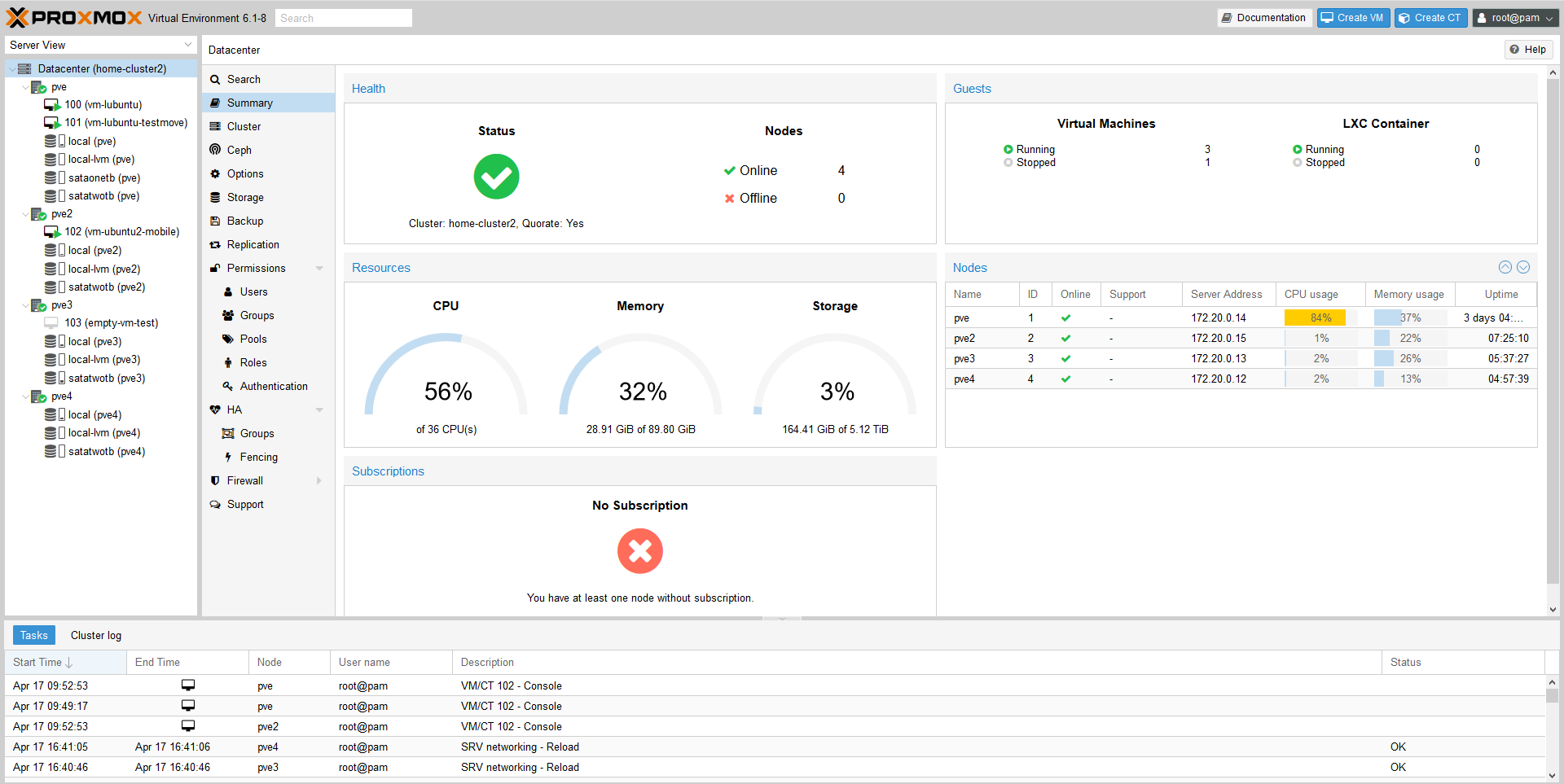 Lately, I migrated my personal lab from ESXI to proxmox hypervisor.
Many reasons are behind this move :
– using vmware esxi free did not allow me proper HA or replication
– each update was painful, and got some CPU no longer supported warnings
– not free open source etc.
– saw proxmox running at other place and was looking good
– the need to learn something new, and to have HA at my home lab as I migrated my workloads from VPS to home (due to OVH suspending an old offer and not allowing to migrate, but rather requiring full re install, in short delays…. tired of not controlling anything, I wanted to move my stack home, and have some redundancy).
Basically, this operation was from the following :
ESXI 6.7 latest update available in 2020 April (aside of the new major 7) to Proxmox PVE 6.1.8
This assume you have an ESXI and proxmox up and running that can reach each other and that you have NO SNAPSHOT on vmware esxi.
I also assume you have a ZFS volume mounted in your proxmox.
On the proxmox node (pve), from the shell, I install SSHFS :
#install SSHFS to mount esxi volumeapt install sshfs
#creating mount pointmkdir /mnt/ssh
#Mount root directory of esxi on /mnt/ssh of pve node
sshfs root@esxi:/ /mnt/ssh
#Convert flat VMDK drive to raw image (reading on esxi via SSHFS and output on your local proxmox)
#The below command must run from a drive where you have enough space to store the full size VMDK (usually /volume-you-created on your proxmox)qemu-img convert /mnt/ssh/vmfs/volumes/<yourdatastore>/<yourvmname>/<yourvmname>-flat.vmkd -O raw <yourvmname>.raw
#Create the target VM in proxmox with the same specs as ESXI, and making sure you pick ZFS volume as storage.
#identify target disk of the created VM in /dev/zvol/<volumeName>/<diskName>
#Once you know where is you new VM (usually a number associated with the VM) volume is you can dump the raw image to the new virtual diskdd bs=1M if=<yourVMname>.raw of=/dev/zvol/<volumeName>/<diskName>
If your machine is loaded, the command above may stale your ZFS and overload the server ( load can be way above amount of availalbe threads, due to default ZFS settings no limiting amount of threads).
A workaround found here actually helped getting around the issue using the option oflag=directdd bs=1M oflag=direct if=<yourVMname>.raw of=/dev/zvol/<volumeName>/<diskName>
Hope this helps, when migrating big VMDKs over 1TB, I had ZFS crashes due to this, command above allows to import them properly.
#When done, start the new VM and see if it boots. The main issue I had either on CentOs or Debian, was that network interface name changed. So at first boot, VM has no network.
#Not a big issue, edit the interface name in /etc/network/interface (debian) or /etc/sysconfig/network-scripts/ifcfg-ethx (CentOs)
#The MAC address changed, unless you forced it while creating the VM.
#As soon as your VM is up, delete the .raw image from your drive to free up space.
This is how I migrated 8 VMs, from ESXI to Proxmox without any issues.
Additional notes following this migration (2020 April 27) :
After migrating my last VM, I had a weird error stating I did not have enough space to replicate, as the system could not take any snapshot.
This is due to a default setting in ZFS, in Proxmox, where by default, a space reservation on the volume is made for snapshots etc, with the same size of the actual disk size.
While fine for most of the case, when you have a VM with 1.66TB drive, it starts to be an issue.
There is more explanation here about ZFS refreservation : http://www.mceith.com/blog/?p=153
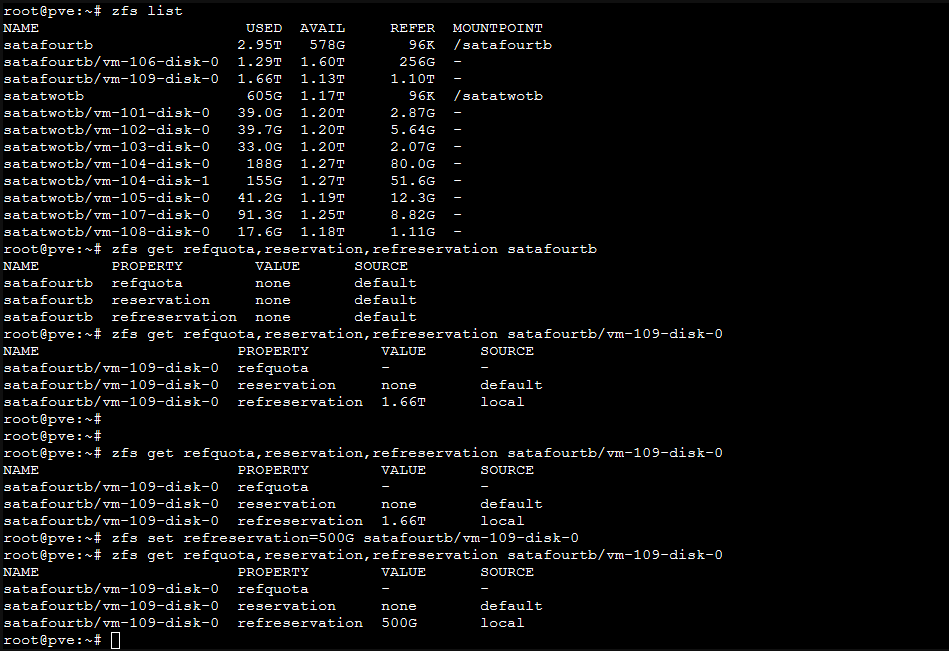
Basically, in my case, the refreservation was as big at 1.66TB, not allowing snapshots to be taken, and therefore, not allowing VM replication.
You can see the information for a volume with the following command :
zfs get refquota,reservation,refreservation yourvolume/your-vm-disk
So basically, for my VM that had a refreservation default value of 1.66TB, I actually did set it to 500G, since my drive only had 578G of unassigned space.
This allowed the replication process to go on :
Hopefully this will help some, facing the disk full issue where disk is not actually full but reserved.

2 Commentaires to Migrate your ESXI VMs to proxmox ZFS
Ajouter un commentaire
Pages
- À propos
- Alexandre Blanc Experience or work background
- Connected=hacked, cloud=leak, why
- Keeping track for my speaking events / appearances
- My take on Zero Trust – SP 800-207
- Openvpn and pihole on OVH VPS Server FAQ
- Raspberry 3 router project FAQ
- Spotting LinkedIn fake profiles, the tail of industrial spying, should I trust this contact ?
Search this Site
Archive
- août 2026
- avril 2025
- juin 2024
- mai 2024
- mars 2024
- février 2022
- janvier 2022
- octobre 2021
- septembre 2021
- mai 2021
- octobre 2020
- juin 2020
- avril 2020
- avril 2019
- janvier 2019
- juin 2018
- mars 2017
- octobre 2016
- août 2016
- mai 2016
- septembre 2015
- mai 2015
- février 2015
- novembre 2014
- septembre 2014
- août 2014
- janvier 2013
- décembre 2012
- juillet 2012
- janvier 2012
- novembre 2011
- octobre 2011
- mai 2011
- avril 2011
- mars 2011
- février 2011
- janvier 2011
- décembre 2010
- novembre 2010
- octobre 2010
- septembre 2010
If you want to run VMs in VMs, like a virtual proxmox, it is called « nested virtualization » and is doable, check proxmox wiki :
https://pve.proxmox.com/wiki/Nested_Virtualization
qm importdisk VMID esxi.vmdk local-zfs -format raw